Platform Solutions Property Managers The Blueprint Customers Pricing Resources Contact Sign in
Home / Platform
Platform Overview

Every stage of the turnover —
running itself.

Trilingual crew app. Branded client portal. Airbnb auto-sync. Verified live photos. Invoicing, payroll, dispatch, and more — one platform for the whole cleaning business.

Start Free — No Credit CardSee What's Included
Replaces
3-5 tools
One platform for the whole business
Setup time
~30 min
CSV import, iCal sync, crew invites
Free trial
14 days
No credit card required
Run the operation

Scheduling and dispatch built around your week

Drag-and-drop calendars, GPS dispatch maps, and recurring jobs — designed for cleaning businesses that run multiple crews across multiple properties every day.

Drag-and-drop calendarDay, week, and month views. Reassign crews and shift times by dragging.
Live GPS dispatch mapSee every crew member's location in real time during the workday.
Recurring jobsWeekly, biweekly, monthly. Auto-creates the next job when the current one closes.
Multi-job clock-outCrew can leave one job, work another, and come back. Time tracked perfectly across all properties.
Smart turnover schedulingSTR turnovers respect 4-hour checkout/check-in windows automatically.
Pending approval queueiCal-generated jobs land for approval. Approve, decline with reason, or auto-approve trusted clients.
Route optimizationOrders the day's cleans for the least drive time — and keeps every turnover inside its checkout-to-check-in window. Crew see it as Stop 1, 2, 3.
Cleans forecastA rolling 12-month view of every clean coming — with back-to-backs and a crews-needed estimate per day. Staff up for peak season before it hits.
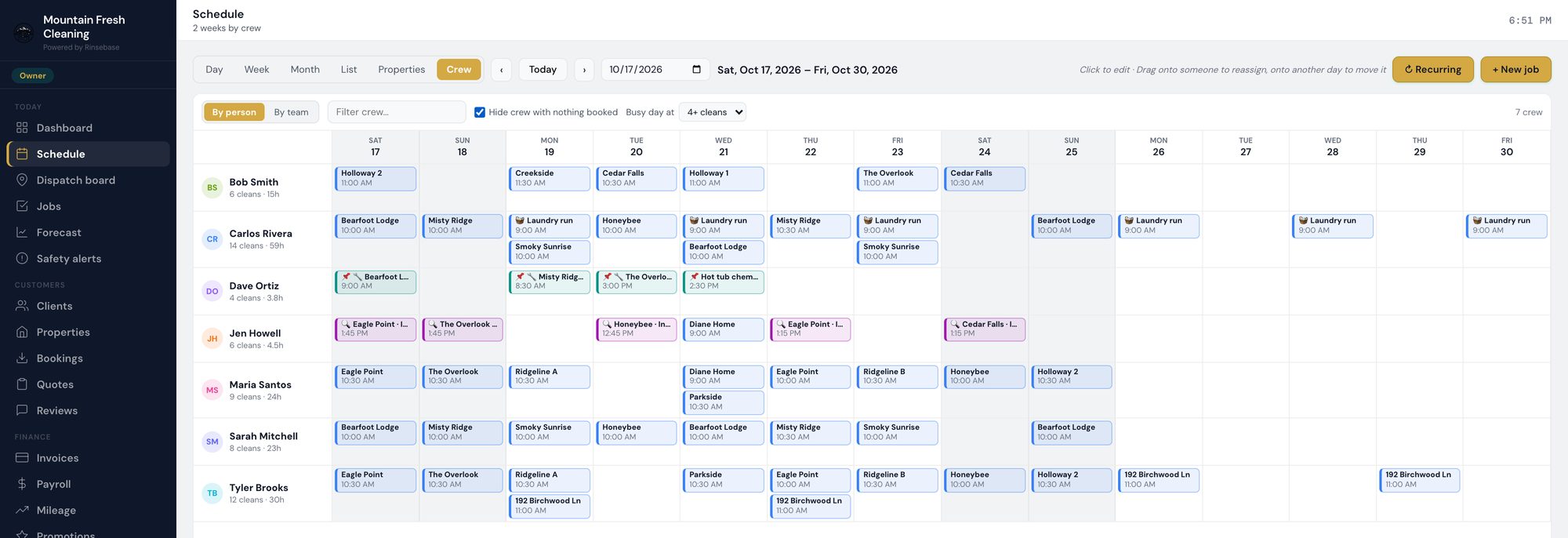
Every kind of visit on one boardCleans, inspections and repair visits share the Schedule. Inspections read magenta, repairs and tasks teal, and the crew view gives each person their own lane.
app.rinsebase.com/schedule
Rinsebase Schedule, two weeks by crew — cleaning crews, a maintenance tech with teal repair visits and an inspector with magenta inspections

Two weeks by crew: cleaning crews, the maintenance tech's repair visits and the inspector's visits, each in its own lane.
Moat feature
Built for how your crew actually works

A trilingual crew app —
every screen in English, Spanish, or Portuguese

Your crew picks their language on first launch. Job details, checklists, photo prompts, push notifications, even the SOS button — all in the language they work in. No translating notes one text at a time.

Translated end to endEvery screen, every notification, every checklist — in all three languages. Not just menu labels.
GPS clock-in / clock-outGeofenced to the property. Location verified at every event.
Per-property pay ratesDifferent rates per property. Lead vs cleaner. Per-individual overrides.
One-tap SOS buttonSends GPS location and active job to dispatch. Built for solo cleaners.
Mileage trackingGPS-recorded between-jobs miles plus manual entry. IRS-rate exports.
Team chatChannels for the whole crew, plus 1:1 messages and per-job message threads.
"On my way" in one tapCrew tap it heading out — dispatch watches them on the live map and the client portal shows "on the way." Location is shared only while they're on the clock.
Time-off requestsCrew request days off right in the app; you approve from the dashboard. No more group-text scheduling.
Moat feature
Stop being the connective tissue

A branded client portal —
on your domain, not theirs

Every Rinsebase tenant gets a public marketing site at /s/yourcompany — services, gallery, service-area ZIPs, embedded booking form. STR hosts and property managers get per-property dashboards with status, photos, history, and KPIs. They stop texting you for updates.

Branded business siteHero, services, gallery, service area, embedded booking — on your domain.
Per-property dashboardsHosts see scheduled cleans, photos, completion status, and history.
Property KPIsRevenue per property, average clean time, recurring issues, automatic low-supply alerts.
Block dates / personal useClients block dates for their own use. iCal also detects blocks automatically.
Property manager portfoliosMulti-property view with portfolio-level KPIs for property management clients.
Auto status notificationsHosts get text or email at each milestone — clean started, completed, photos uploaded.
Built for short-term rentals

Airbnb, VRBO, and every iCal calendar —
auto-creates jobs

Paste your client's iCal URL once. New reservations create cleaning jobs automatically — with the right turnover window, crew, and checklist. Cancellations clean up the schedule. Block dates flow through. You stop rebuilding the calendar by hand.

The job arrives carrying the property with it. Access and lockbox codes, arrival instructions, crew notes, per-property checklists and PAR levels live on the address — what the Blueprint calls the Property Knowledge Book™ — so the clean doesn't depend on who happens to be free that day.

Every booking calendarOwnerRez, Hospitable, Guesty and Hostaway by direct API — Airbnb, VRBO, or anything that exports iCal.
Auto-job creationNew reservation = new turnover job, with the right window, crew, and checklist.
Turnover window detectionBack-to-back stays trigger a tighter turnover. Same-day checkouts get priority.
Cancellation auto-cleanupGuest cancels on Airbnb? Sync detects it and cancels the cleaning job automatically.
Power outage alertsPer-property power monitoring. Notifies your client and dispatcher before crew shows up to a dark house.
Weather widgetPer-property forecast and severe weather alerts. Plan turnovers around storms.
Daily linen pull sheetOne printable morning list of exactly which linens to pull per property, plus the grand total for the linen room. No trips back to the closet.
Moat feature
Photos hosts can actually trust

Camera-verified live photos —
not a gallery upload

The crew app opens the camera directly — gallery access is blocked, and editing is off, so a photo can't be a screenshot, a crop, or last week's clean. On the web, photo timestamps are validated too, and stale uploads are rejected.

Which matters because of what the photos are for. Cleaning is an activity; guest-ready is a state — and in Rinsebase it's a status someone with the authority sets and stamps, not an assumption made when the vacuum goes back in the van. That flag is what your client's portal reads.

Camera-only captureMobile camera opens directly. Gallery access blocked. No old photos.
Timestamp check on web uploadsPhoto taken more than 4 hours ago? Rejected.
Per-checklist photo requirementsProperty owners require photos on specific checklist items. Crew can't complete the job without them.
Before / after workflowsCapture both states for high-trust client reporting.
Damage reportsCrew flag damage at the source, from the room, with photos and notes. You review it before your client hears about it.
Unified issues feedDamage, lost & found, maintenance, and low supplies roll into one triage feed. Nothing reaches the host until you review it and send it.
New
Quality you can prove, problems that get fixed

Inspections and repairs —
the other half of operations

For a property manager, operations means cleaning and what the cleaning crew finds. Rinsebase books an independent inspection with the clean and scores the result, and it turns the hot tub cover, the deck board or the ants a crew reports into a repair visit someone owns — on the same schedule, with the record kept.

Inspections booked with the cleanPick the inspector when you schedule the clean, add one to any clean already booked — calendar-synced ones too — or let risk rules create them after a clean.
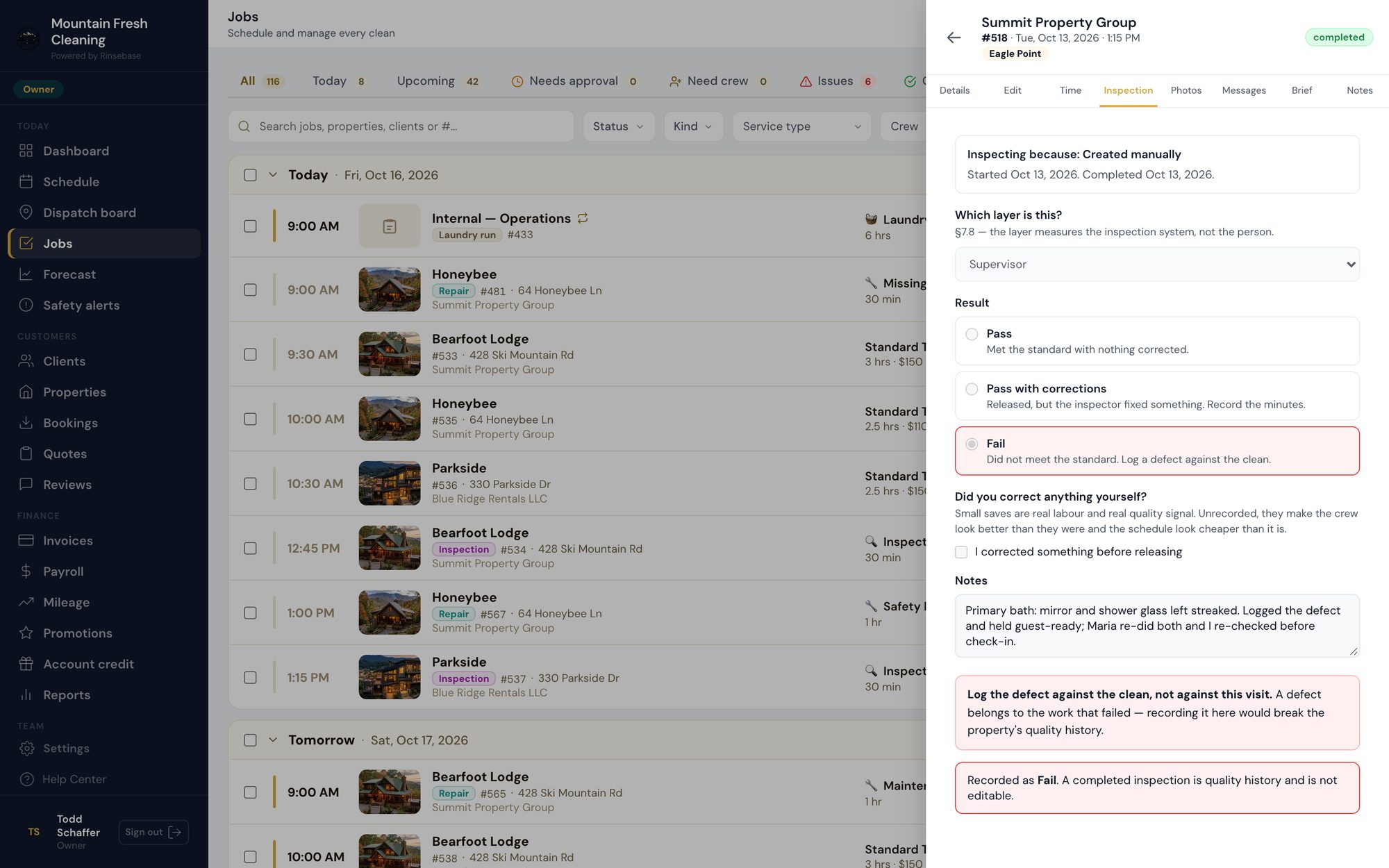
Pass, pass with corrections, or failYour inspector reviews the crew's checklist room by room, then files a result that can't be quietly edited later.
Defects to corrective actionsA failure becomes a defect with a room, severity and root cause, and a corrective action that closes on verification.
Quality reportFirst-pass yield, pass rate, escape rate, photo compliance and repeat defects — banded, and honest about under-reporting. Growth and up.
Incidents from the roomDamage, maintenance, pest and safety issues, filed by the crew with photos. Every plan.
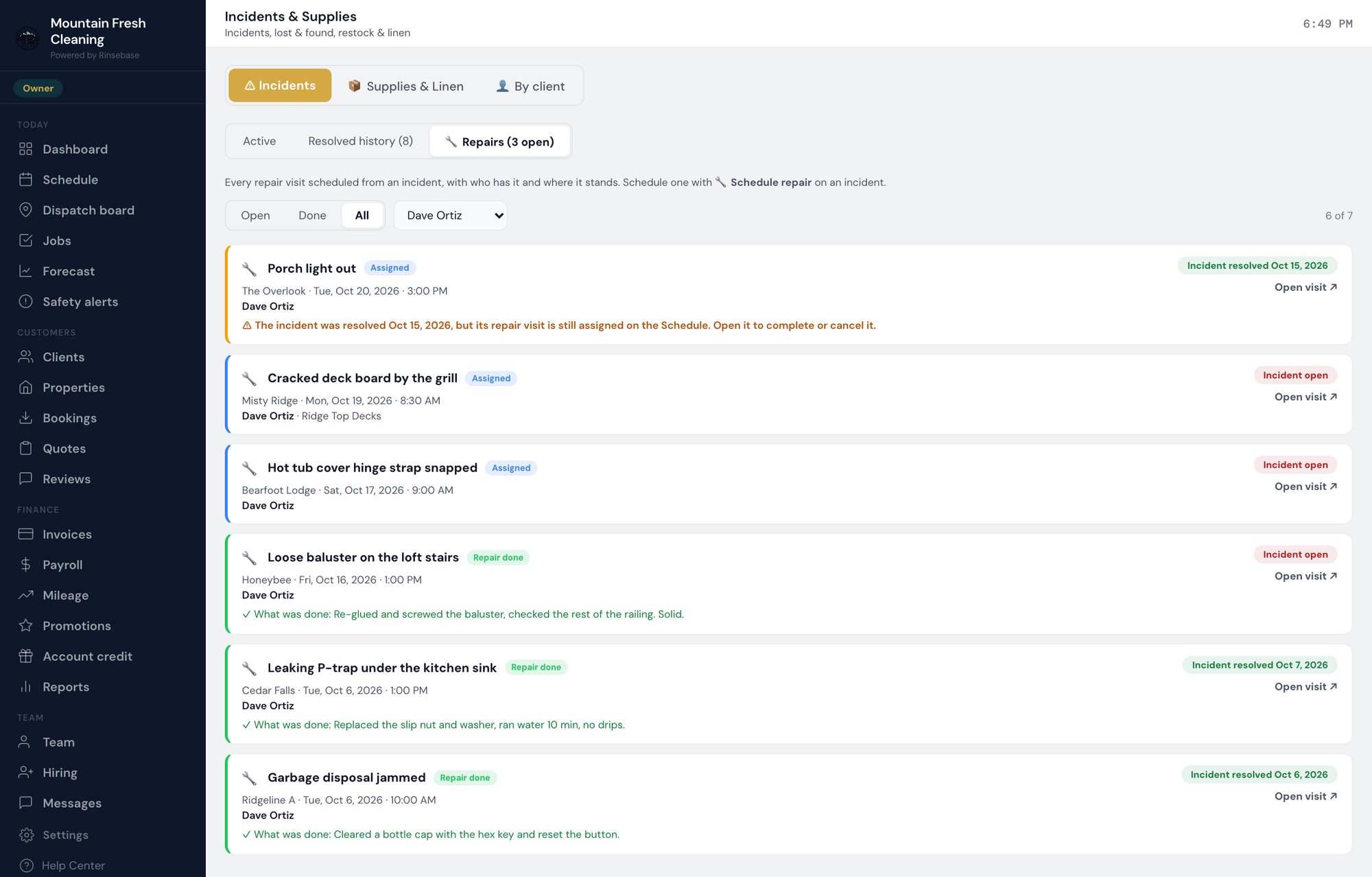
Schedule repair, then the Repairs logOne click books a repair visit for your maintenance tech or an outside contractor; the log shows every visit, open and done, and what was done. Pro and Scale.
app.rinsebase.com/jobs
Rinsebase inspection record — Pass / Pass with corrections / Fail, the inspector's notes and the filed result

A filed inspection.

app.rinsebase.com/issues
Rinsebase Repairs view — every repair visit with its stage, property, date, tech and what was done

The Repairs log.

How inspections work →  ·  How repairs work →

From clean to paid, automatically

Invoicing, payments, and payroll —
without the spreadsheets

A clean ends, an invoice goes out. The client pays online by card or ACH. Crew hours flow into payroll with per-property pay rates pre-applied. Quotes auto-convert to jobs when accepted. You stop reconciling.

Auto-invoice on completionInvoice generated and emailed when the job closes. Promo codes and adjustments supported.
Stripe Connect paymentsCard and ACH. Funds direct to your bank.
Recurring invoicingWeekly, biweekly, monthly billing for residential and commercial accounts.
Payroll with mixed pay typesHourly, per-job, per-property, salary, bi-weekly. Annual salary supported.
Quote-to-job conversionSend a professional quote. Client accepts online. Job lands on your schedule automatically.
QuickBooks Online syncNative one-click sync for QuickBooks Online; CSV export for QuickBooks Desktop.
Reporting and visibility

Know what's working —
and what isn't

Owner dashboards, per-crew performance, per-property KPIs, automatic low-supply alerts, and reports your bookkeeper can actually use.

Owner command centerToday's jobs, this week's revenue, approval queue, restock alerts — all in one screen.
Crew performance reportsAverage job time, on-time rate, photo completion, client review scores.
Per-property KPIsRevenue per property, recurring issues, supply usage trends.
Supply trackingCrew logs what's used each clean. When stock hits your threshold, the system flags owners and clients automatically.
Quality reportInspection pass rate, first-pass yield, defects by cause and photo compliance per period — the numbers you bring to a renewal.

How does Rinsebase compare?

See what's different vs. ZenMaid, Jobber, HouseCallPro, Turno, Taskbird, and Connecteam.

Connect your tools

Zapier integration —
7,000+ apps, no code required

Generate one API key in Settings → Integrations, paste it into the Rinsebase Zapier app, and connect your entire business stack. Gmail, Google Sheets, Slack, HubSpot — if it's on Zapier, it talks to Rinsebase. (QuickBooks Online syncs natively — no Zapier required.)

Job Completed triggerFires every time a crew member marks a job done — log to Google Sheets, notify via Slack, or trigger any of 7,000+ apps.
Invoice Paid triggerFires the moment a client pays — update a revenue tracker, post to Slack, or kick off a review request.
Create Client actionNew lead in your CRM or booking form? Push them straight into Rinsebase as a client — no manual entry.
Find Client by EmailLook up an existing client before creating a duplicate — perfect for "find or create" Zap patterns.
Most popular Zap: Invoice Paid → Google Sheets
Client pays in Rinsebase → your revenue spreadsheet updates in real time. (QuickBooks Online syncs natively — no Zap needed.)
See all integrations →
Todd Schaffer, Founder of Rinsebase
A note from the founder

"I'm Todd. Marine Corps veteran. My wife runs a cleaning crew. I watched her manage Airbnb turnovers on a spreadsheet — fielding host texts at 9pm, translating notes for her Spanish-speaking crew, chasing late payments. So I built her the software that didn't exist."

— Todd Schaffer
Founder, Rinsebase · USMC Veteran

Every feature.
One tool.

Stop paying three subscriptions for what should run from one place. 14-day free trial, no credit card, plans from $39/mo.

Start Free TrialBook a Demo

14-day free trial. No credit card. Cancel anytime.