Platform Solutions Property Managers The Blueprint Customers Pricing Resources Contact Sign in
Home / Vacation Rental Maintenance Software
Incidents & repairs for STR cleaning companies

Your crew found it.
Now it gets fixed.

Your crews are the only people inside every property on a schedule — so they find the snapped hinge, the cracked deck board and the ants before anyone else does. Rinsebase turns what they find into a repair visit with a name, a date and a record, on the same schedule as your cleans.

Book a Demo With the FounderStart Free Trial
app.rinsebase.com/issues
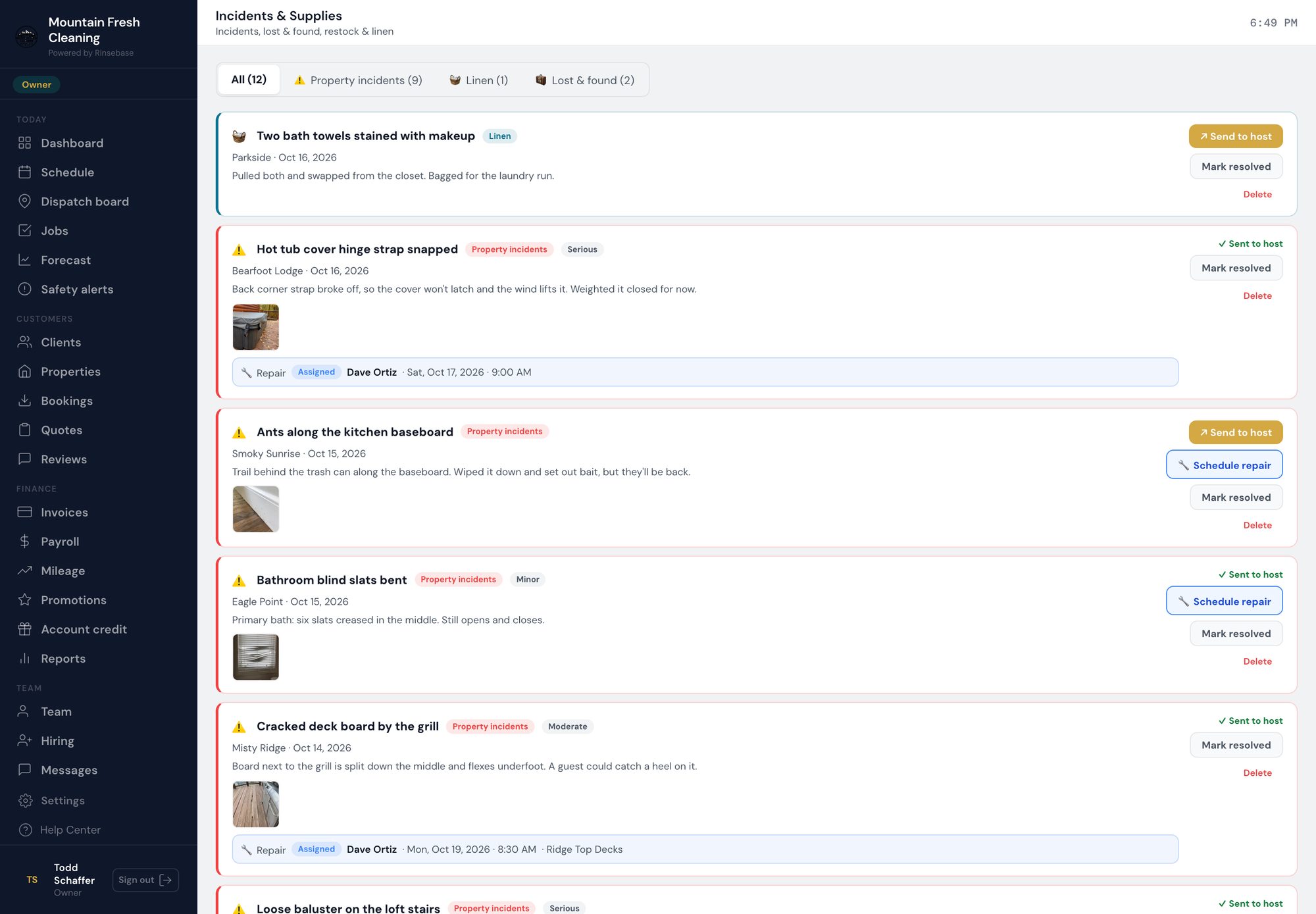
Rinsebase incidents feed — crew-filed incidents with photos, severity, Sent to host status, and the repair visit booked for each one

The incidents feed: what crews filed today, with their photos, and the repair visit already booked for the ones that need one.

Found by
Your crew
Filed from the room, with photos
Booked in
One click
A repair visit for your tech or a contractor
On the record
Every visit
Open, done, and what was done
The enemy

Right now, the repair
lives in a text thread

It's 11:40 on a Saturday turnover. Your lead sends you a photo of a hot tub cover with the hinge strap snapped and a text: "cover won't latch." You forward it to your handyman. He sends a thumbs-up. Then nothing — no date, no name, nothing anyone else can see.

Two turnovers later a different crew finds the same cover and sends the same photo. Was it fixed and broke again? Was it never fixed? Is it on the property manager's list or yours? Nobody knows, because the only record is a camera roll and a group chat.

That is how small repairs become guest complaints: not because nobody noticed, but because noticing never turned into anyone's job.

01 / FOUND

Found mid-clean,
filed from the room

Your crew files an incident from the crew app while they're standing in front of the problem: the room, what kind of problem it is, a description and photos. It lands in one feed alongside your lost & found and linen issues, attached to the property and the clean it came from — and, when the calendar has it, the guest who just checked out.

DamageMaintenance neededPest issueSafety hazardMissing itemLost & foundLinen
Nothing reaches your client until you send it. Every incident waits in your feed. You decide what the host hears, and when, with Send to host.
Severity on the record. Minor, moderate or serious — so the cracked deck board doesn't sit in the same pile as a bent blind.
On every plan. Incident reporting is part of every Rinsebase plan, Starter included.
02 / BOOKED

One click from incident
to repair visit

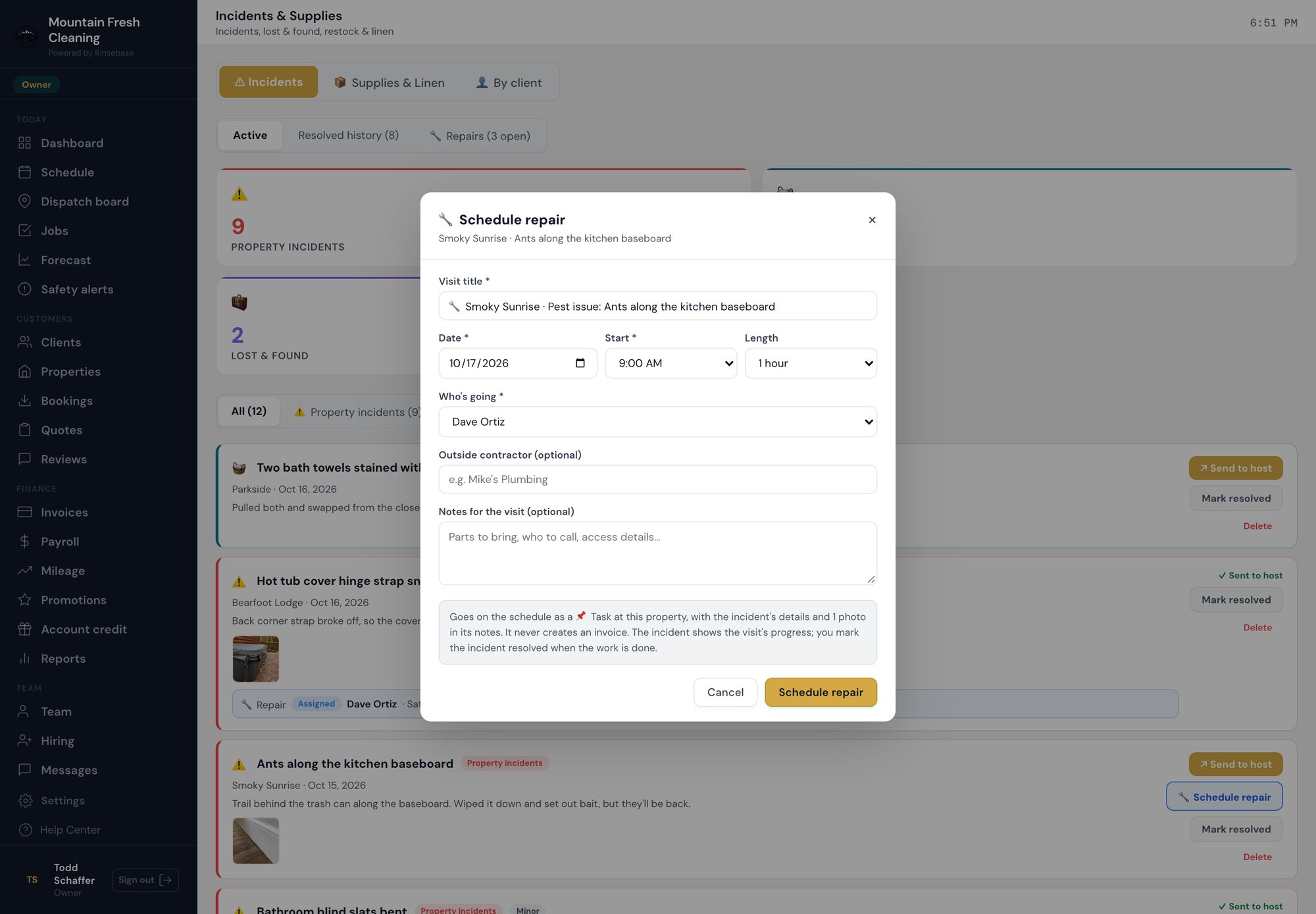
On the incident, Schedule repair opens with the visit already written: the property, the room and the problem in the title, the crew's description and photo in its notes. Pick the day, the start time, how long it takes and who's going — and it's on the schedule.

app.rinsebase.com/issues
Rinsebase Schedule repair dialog — visit title prefilled from the incident, date, start time, length, the maintenance tech, an optional outside contractor and notes

Schedule repair on a pest report: the title, the property and the crew's photo come from the incident.

Your maintenance tech, first in the list. Give your handyman the Maintenance role and they're the first name in the picker — already selected when they're the only one.
Or an outside contractor. Name the plumber or the deck company on the visit, so the record says who actually did the work.
It never creates an invoice. A repair visit is a Task on your schedule, not a clean, so it can't bill your client by accident. What you charge for the repair is your call.
Assigned→On the way→In progress→Repair done

The incident shows the visit's progress straight from the visit itself, so nobody updates two places. You mark the incident resolved when the work is done.

03 / ONE SCHEDULE

Cleans, inspections and repairs
on one board

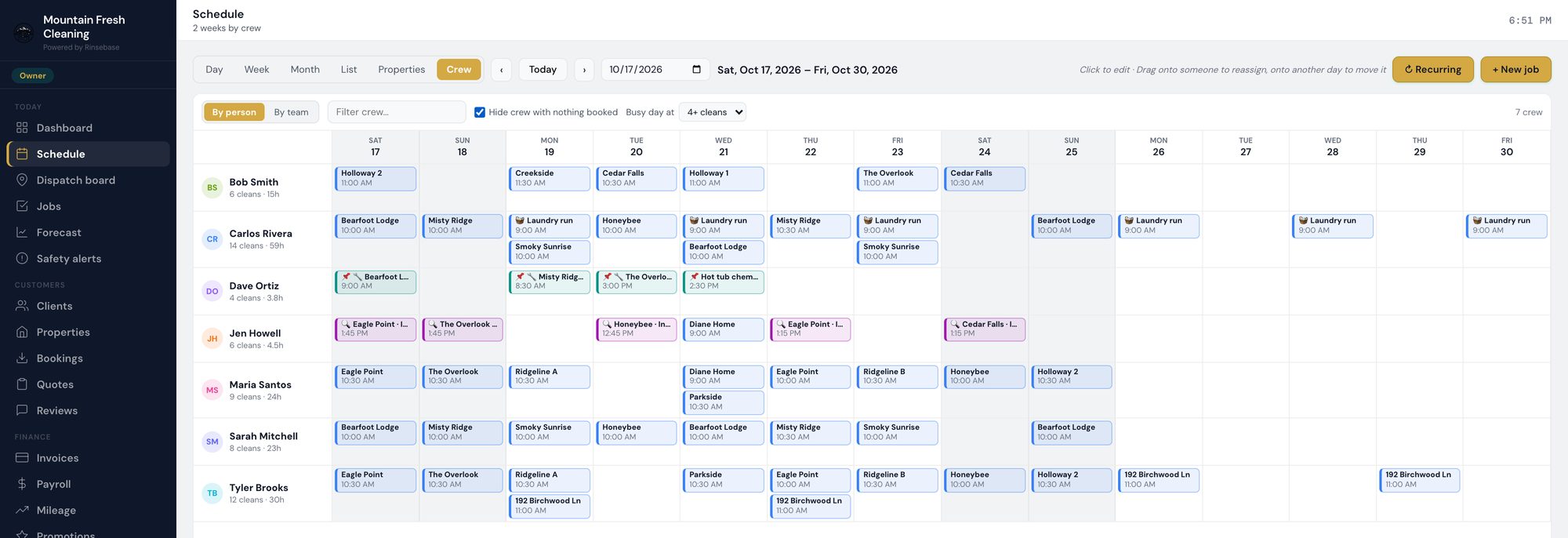
A repair visit sits on your Schedule at the property, with your tech's name on it — next to the cleans and the inspections, not in a separate system nobody opens. Repairs and other tasks read teal, inspections magenta, so one look at the week tells you who is where, and why.

app.rinsebase.com/schedule
Rinsebase Schedule, two weeks by crew — cleaning crews, a maintenance tech with teal repair visits and an inspector with magenta inspections

Two weeks by crew: the maintenance tech's repair visits and the inspector's visits in their own lanes, beside the cleaning crews.

On the crew app the visit carries the property's address and directions, and when your tech completes it, they're asked what they did. That line is what shows up on the incident and in the log.

04 / THE LOG

A maintenance log
you can answer from

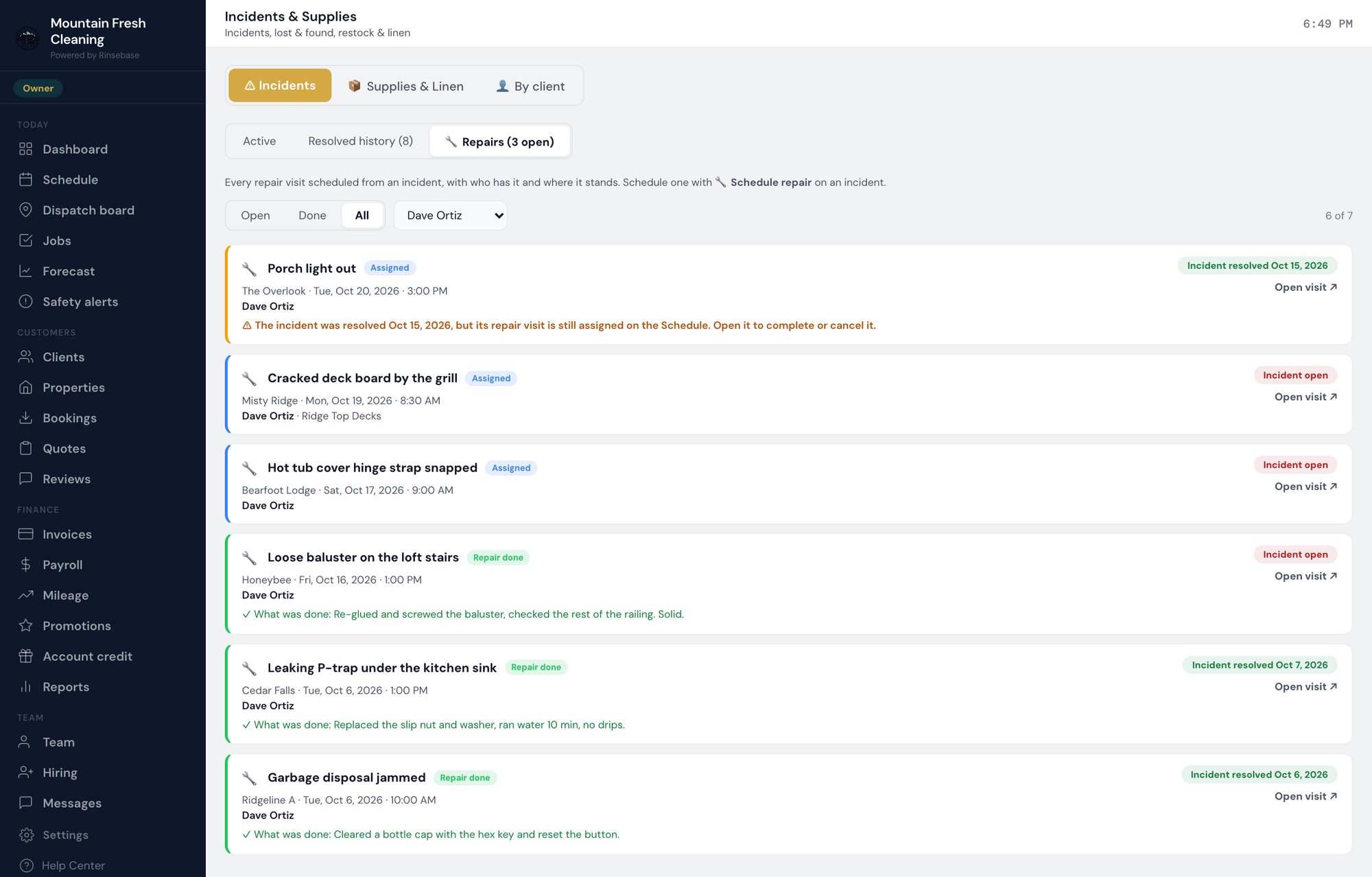
When a property manager asks whether the deck board by the grill was ever fixed, the answer is one screen away. The Repairs view lists every visit booked from an incident — open, done, or all of them, filtered by tech — with when it was, who went, and what they wrote when they finished.

app.rinsebase.com/issues
Rinsebase Repairs view — every repair visit with its stage, property, date, tech, outside contractor and what was done, plus a flag on a visit left open after its incident was resolved

The Repairs view for one tech: three visits booked, three done with notes — and one flagged because its incident was resolved while the visit was still on the schedule.

What was done, in the tech's words. The note left at completion shows on the log and on the incident it came from.
Loose ends get flagged. If an incident is resolved while its repair visit is still on the schedule, the log says so in amber — so a visit nobody needs doesn't linger, and one that's still needed doesn't get forgotten.
Resolved history keeps the paper trail. Every resolved incident keeps its resolution note and who resolved it.
05 / THE PAYOFF

Finding it is a favor.
Fixing it is a service.

For a property manager, operations means cleaning and maintenance. A cleaning company that only reports problems is a vendor. One that finds them, books the fix and can show the record of every repair is the partner that gets renewed — and gets handed the next twenty units.

What it isn't: a facilities system. There's no asset register and no preventative-maintenance calendar. Rinsebase covers the part that starts where your crews are — inside the property, on a schedule — and makes sure what they find becomes somebody's job.
Plans: incident reports are on every plan. Schedule repair and the Repairs view are on Pro and Scale. Priced by crew — never per property, never per work order. See pricing
Todd Schaffer, Founder of Rinsebase
A note from the founder

"A customer asked me the obvious question: her crews were already finding the problems, so why did the fix still live in her texts? This is the answer. On the call we'll set up your maintenance tech and walk one incident from a crew's phone to a finished repair."

— Todd Schaffer
Founder, Rinsebase · USMC Veteran
Common questions

Incidents and repairs —
straight answers

What is vacation rental maintenance software for a cleaning company?
It's the part of your operations platform that turns what your crews find during a clean into a repair someone owns. In Rinsebase, a crew member files an incident from the room they're in — damage, maintenance needed, a pest or a safety hazard — with a description and photos. You review it, and Schedule repair books a repair visit at that property for your maintenance tech, on the same schedule as your cleans. The Repairs view keeps the log: every visit, open or done, who went, and what they did.
How does a repair get scheduled?
From the incident itself. Schedule repair opens with the visit's title already written from the property, the room and the problem, and the crew's description and photo in its notes. You choose the day, the start time, how long it takes and who is going, and it goes on the Schedule as a Task at that property. The incident then shows the visit's progress — assigned, on the way, in progress, repair done — until you mark the incident resolved.
Can an outside contractor do the repair?
Yes. Name the contractor on the visit — a plumber, a deck company — and it shows on the incident and in the Repairs log next to the person you put on the visit, so the record says who actually did the work. Give your own handyman the Maintenance role and they are listed first when you pick who's going.
Does a repair visit bill my client?
No. A repair visit is a Task, and a Task never creates an invoice, so a repair can't bill your client by accident. What you charge for the repair, and how, stays your decision.
What does my client see?
Your client's portal shows their cleans — not your repair visits or your internal tasks. Incidents reach them only when you choose: each one waits in your incidents feed until you send it to the host.
Which plans include repair scheduling?
Incident reports are on every plan. Schedule repair and the Repairs view are on Pro and Scale. A repair visit that is already on your Schedule stays there as an ordinary Task if you ever change plans, so nothing gets stranded.
Make every find
somebody's job.

A 30-minute call with the founder: we'll set up your maintenance tech, walk an incident from the crew's phone to a booked repair, and show you the log — on your own properties.

Book a Demo With the FounderStart Free Trial

14-day free trial · No credit card · Priced by crew, never per work order · Unlimited properties