Platform Solutions Property Managers The Blueprint Customers Pricing Resources Contact Sign in
Home / AI for Cleaning Companies
AI assistants for STR cleaning companies

Ask your own AI.
Confirm it in Rinsebase.

Connect the Claude or ChatGPT you already use to the operation you run — every property you clean, every crew, every market. Ask what’s happening in plain words. When something has to change, your AI prepares it, and Rinsebase shows you exactly what will happen before anything does.

Book a Demo With the FounderStart Free Trial
Your AI
Claude or ChatGPT
Your own account, connected to Rinsebase
Changes
You confirm
Nothing happens until you click Confirm
Never sees
Codes, wifi, pay
Or prices, or client contact details
The enemy

Every simple question
is a dig through screens

It’s Thursday night. A property manager texts that Saturday’s guest at Eagle Point is checking out late, and Tyler just told you he can’t make Saturday. To answer, you open the Schedule, check who else is free Saturday morning, check who’s already booked, check the checkout time, then make the swap and hope you didn’t double-book anyone.

None of that is hard. It’s just ten minutes of clicking for one answer, and you do it all day. The software knows everything you need. You’re the one doing the looking up.

Rinsebase lets you ask instead — in the AI app you already have open — and keeps every change in your hands.

01 / ASK

Ask about your day
in plain words

Owners, admins and managers each connect their own Claude or ChatGPT to Rinsebase. Then they ask the way they’d ask an office manager who knows the whole operation:

“What’s unassigned tomorrow?”“Who’s on the clean at Bearfoot Lodge right now?”“Is Maria free Saturday morning?”“Which cleans are running late today?”“What open incidents and restock flags need attention?”“Is every calendar syncing?”“How did last month go?”

It answers from your live Rinsebase account: the schedule with each clean’s crew, lead and status, guest checkout and next check-in for turnovers, how today is going, crew availability — time off, weekly hours and the cleans they already have — and the open incidents and restock flags your crews filed.

The whole operation, not one screen. Hundreds of properties, every crew, every client: ask across all of it in one question.
Built for more than one market. Every time is the home’s own local time. When the properties you clean span time zones, your company’s time is shown beside it, and your AI asks which zone you mean when it isn’t clear.
Big questions stay readable. Ask about a whole week and it leads with a count per day and the cleans that need attention first — the full list when you ask for it.
02 / CALENDARS AND REPORTS

Know every calendar is syncing.
Know how the month went.

The turnover that never reaches the schedule is the one that costs you the account. Ask “Is everything syncing?” and your AI checks every client calendar link and PMS account the way the Calendar health card on your dashboard does: which properties are syncing, which aren’t, when each last synced, and why, in plain words — a calendar link that stopped working, a client account that needs reconnecting, a listing no connection covers any more. When an upcoming booking has no clean, it looks at that home’s calendars, stays and cleans together.

“Is everything syncing?”“Why didn’t a clean show up for Saturday’s Eagle Point booking?”“How did last month go?”“Which cleans finished without a photo or video in October?”“What did inspectors fail most this quarter?”
Sync problems you can act on. Failing or stale, when it last synced, and what to do next, with the help article to fix it. Paused calendars never count as failing, and your AI never sees calendar links or API keys.
Last month in one question. For any stretch up to three months, the whole company or one property: cleans completed, cancelled and no-show, late starts, cleans finished without a photo or video or without the checklist, the inspection pass rate and the lines inspectors failed most, incidents and restock flags by property, and each crew member’s cleans and hours.
No money in it. Revenue, invoices, prices and pay stay out of your AI. Owners and admins see them on the Reports page in Rinsebase.
03 / PROPOSE, THEN CONFIRM

It prepares the change.
You make the call.

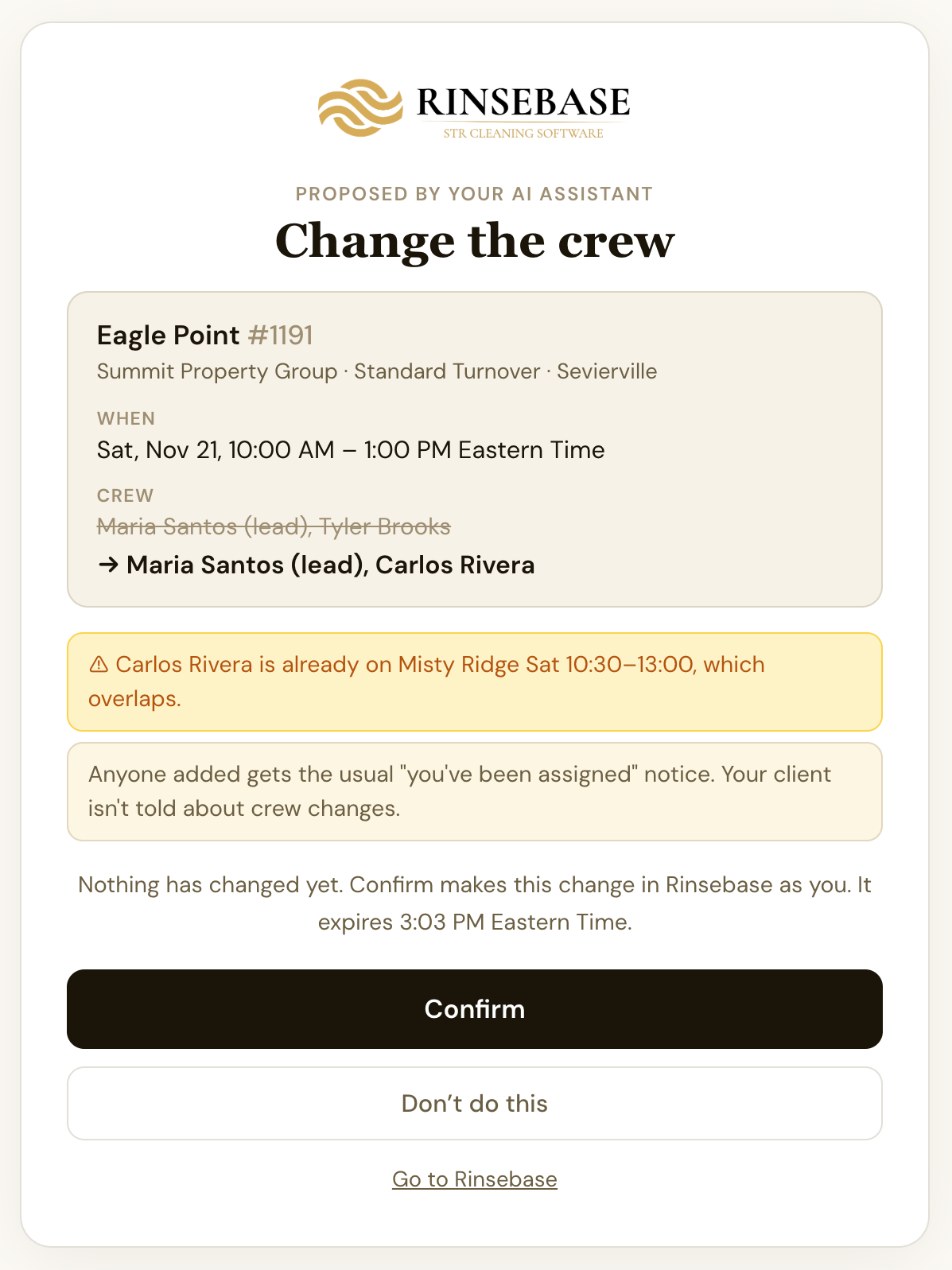
Ask for a change the way you’d text it: “Swap Tyler for Carlos on Saturday’s Eagle Point turnover.” Your AI doesn’t touch the schedule. It sends back a Rinsebase link, and Rinsebase shows you exactly what will change — the property, the day and time, the crew and the lead — plus anything worth a second look before you decide.

You ask→Your AI proposes→Rinsebase checks→You confirm
Add a clean the way you’d text it. “Add a deep clean at Bearfoot Lodge tomorrow at 10, with Carlos as lead.” Rinsebase fills in the length if you don’t give one, and flags a clean already there that day, a guest still in the home, or anyone off or double-booked.
Move a clean, change the crew and lead, approve or decline a clean waiting on approval, or cancel one. Declining can email your client the reason your AI wrote, so you read it before you confirm.
Warnings before, not apologies after. Someone double-booked or on time off, a day they don’t work, a start before the guest checks out, a day outside the booking window.
The same rules as your own screens. Confirm makes the change as you, exactly as Rinsebase does it: a moved clean tells the crew and your client the new time, the way a drag on the Schedule does.
Only you confirm what your AI proposed. A proposal is good for 2 hours, and Undo works for 24 hours as long as nobody has changed the clean since.
Rinsebase confirm page for a change an AI assistant proposed: change the crew on the Eagle Point turnover from Maria Santos and Tyler Brooks to Maria Santos and Carlos Rivera, with a warning that Carlos Rivera is already on Misty Ridge at the same time, and Confirm and Don't do this buttons

A crew swap your AI proposed. Rinsebase flags that Carlos is already on Misty Ridge, and nothing changes until you click Confirm.

04 / HOW-TO

It knows how Rinsebase
works, too

Ask how to set up a recurring clean, connect a client’s Hospitable account, invite a new crew member or turn on autopay for a client, and your AI answers step by step from the Rinsebase help center, with a link to the article. If the help center doesn’t cover something, your AI is told to say so.

It’s the fastest way to train a new office manager — and your how-to questions are searched inside Rinsebase, not sent to another search service.

05 / WHAT IT SEES

Sees what it needs.
Nothing it doesn’t.

Your AI reads the operation, not the keys to it. What it reads goes to the AI company — Anthropic for Claude, OpenAI for ChatGPT — under that person’s own account with them, the same as anything else they ask it.

It can see

  • The schedule: times, status, crew and lead, guest checkout and next check-in
  • How today is going
  • Properties: address, client, bedrooms, area, default crew, upcoming stays as dates
  • Crew availability: time off, weekly hours, the cleans they already have
  • Client names
  • Open incident reports and restock flags
  • Calendar sync: which properties are syncing, which aren’t, and why
  • Operations reports: cleans, late starts, photo and checklist proof, inspections, incidents, hours
  • The Rinsebase help center

It never sees

  • Door and lockbox codes
  • Wifi passwords and arrival instructions
  • Crew notes and internal notes
  • Prices, pay, invoices and revenue
  • Calendar links and API keys
  • Client email or phone numbers
  • Your client’s guests’ names
  • The kind of time off someone took
Off until you turn it on. An owner or admin switches on AI assistants for the company. Owners, admins and managers can connect; dispatchers and crew can’t.
Every new connection is announced. It emails the person who made it and your owners and admins, so a connection nobody recognizes gets noticed.
One switch pauses it all. Disconnect any one connection, or pause every connection in your company at once. Someone who leaves, or stops being an owner, admin or manager, is disconnected right away.
06 / YOUR AI, NOT ANOTHER ONE

Bring the Claude or ChatGPT
you already trust

You probably already use Claude or ChatGPT for the email to a property manager, the quote, the job post. Rinsebase doesn’t ask you to learn another chatbot. It gives the one you use the operation you run.

One assistant for the whole day. The same chat that drafts your property manager’s email can check tomorrow’s schedule and line up the crew swap.
Nothing to buy from us. AI assistants are included on Growth and up. Your Claude or ChatGPT plan stays yours.
It improves when they do. When Anthropic or OpenAI release a better model, the AI you’ve connected to Rinsebase is that better model.

Three steps to connect

An owner or admin opens Settings → Integrations → AI assistants in Rinsebase, switches on Allow AI assistants, and confirms.
Each person adds Rinsebase to their AI app with the address https://app.rinsebase.com/mcp — a custom connector in Claude (any plan), or a custom MCP server in ChatGPT Business, Enterprise or Edu on the web.
Their AI app opens Rinsebase. They check it names the right app, company and login, and click Approve.

Full steps for both apps are in the help center: AI Assistants (Claude and ChatGPT).

What it isn’t: an autopilot. Your AI reads and proposes; a person confirms every change in Rinsebase, a new clean included.
Plans: AI assistants are on Growth and up, at no extra charge. Priced by crew — never per property. See pricing
Common questions

AI assistants —
straight answers

Does Rinsebase have an AI assistant?
Yes, and it's yours: Rinsebase connects to the Claude or ChatGPT account you already use. Owners, admins and managers ask about the schedule, crew availability, properties, open problems, whether every calendar is syncing and how last month went, in plain words, and ask for changes — adding or moving a clean, changing the crew, approving, declining or cancelling one. Your AI prepares each change, and nothing happens until you confirm it in Rinsebase.
Which AI apps work with Rinsebase?
Claude on any plan — the Free plan allows one custom connector, and on Claude Team or Enterprise your Claude organization's owner adds it first — and ChatGPT Business, Enterprise or Edu on the web, where a workspace admin adds it. ChatGPT Pro can read Rinsebase but can't propose changes; ChatGPT Plus and Free can't connect.
Does Rinsebase have an MCP server?
Yes. Rinsebase's MCP server is at https://app.rinsebase.com/mcp. A company's owners, admins and managers connect Claude or ChatGPT to it with an OAuth sign-in that each person approves in Rinsebase. It gives their AI tools to read the schedule, crew availability, properties and open problems, to search the Rinsebase help center, and to propose changes that a person confirms in Rinsebase. It serves only that company's own account, not a public data feed, and works with Claude and ChatGPT today.
Can my AI change the schedule on its own?
No. It proposes; you confirm. Every change comes back as a Rinsebase link that shows the property, the time, the crew and anything worth a second look — someone double-booked or off that day, a start before the guest checks out. Nothing changes until the person who asked clicks Confirm. A proposal expires after 2 hours, and Undo works for 24 hours.
What can my AI see?
The schedule, how today is going, the properties you clean, crew availability, client names, open incident reports and restock flags, whether each property's calendar is syncing, and operations reports: cleans, inspections and hours. It never sees door and lockbox codes, wifi passwords, arrival instructions, crew notes, internal notes, prices, pay, invoices or revenue, client email or phone numbers, your client's guests' names, calendar links or API keys, or the kind of time off someone took.
Can my AI tell me when a calendar stops syncing?
Yes. Ask whether everything is syncing and your AI checks every client calendar link and PMS account the way the Calendar health card on your dashboard does: which properties need attention, whether a calendar is failing or stale, when it last synced, and the reason in plain words, such as a calendar link that stopped working or a client account that needs reconnecting. Paused calendars never count as failing, and it never sees calendar links, API keys or the software's own error messages.
Can my AI report on how the business is running?
Yes, for any period up to three months, for the whole company or one property: cleans completed, cancelled and no-show, late starts, cleans finished without a photo or video or without the checklist done, the inspection pass rate and the lines inspectors failed most, incidents and restock flags by property, and each person's cleans and hours. There's no money in it: no revenue, invoices, prices or pay. Owners and admins see those on the Reports page in Rinsebase.
Does it work across time zones?
Yes. Every time is the home's own local time. When the properties you clean span more than one time zone, the confirm page shows each home's local time with your company's time under it, and your AI asks which zone you mean when it isn't clear.
Who can connect, and how do we stay in control?
Owners, admins and managers, each with their own AI account; dispatchers and crew can't connect. AI assistants stay off until an owner or admin turns them on under Settings → Integrations. Every new connection emails your owners and admins, everyone can disconnect their own, owners and admins can disconnect anyone's, and one switch pauses every connection at once.
Which plans include AI assistants?
Growth and up, at no extra charge. Rinsebase is priced by crew, never per property, and you use your own Claude or ChatGPT plan.
Run the operation
by asking.

A 30-minute call with the founder: we’ll connect your Claude or ChatGPT to your own Rinsebase account and ask it about your week — live.

Book a Demo With the FounderStart Free Trial

14-day free trial · No credit card · AI assistants on Growth and up · Unlimited properties